
To manage your organisation's simulations, you will need an Admin or Owner account.
Manage adaptive simulations
To begin, navigate to the Phishing Simulation tab in the left-hand sidebar. You can use adaptive difficulty with both Normal and Automation simulations.
To set up a simulation:
-
Select your preferred simulation type (Normal or Automation).
-
Select the Users or Tags you wish to include in the simulation.
-
Start Simulation or Automation.
With Automation phishing it's best to select a variety of templates from the library to ensure there are enough difficulty levels available for the system to assign different ones each time.
User levels
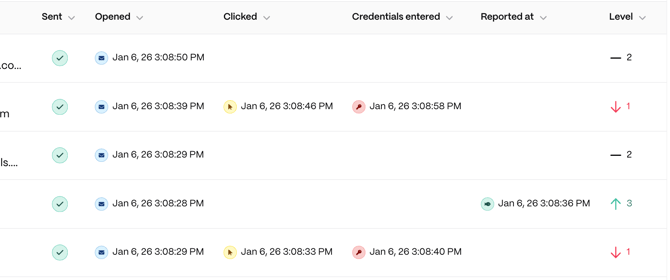
All users start at Level 1. Their level is updated automatically after they interact (or choose not to interact) with a simulation.
How levels are calculated:
-
Report a phish: Increases the user by 1 level.
-
Open (no further action): The user remains at their current level.
-
Click link or enter credentials: Reduces the user by 1 level.
Template difficulty:
The system automatically assigns templates based on the user's current level:
- User Level 1 - Difficulty 1 & 2 (Foundational)
- User Level 2 - Difficulty 3 (Intermediate)
- User Level 3 - Difficulty 4 & 5 (Advanced)
Check simulation results
Once the simulation is active and users begin interacting with the emails, you can monitor their progress.
In the Phishing Simulation area, you can:
-
See which level each user has moved to based on their latest interaction.
-
Track how many users are progressing toward more challenging templates.
-
Download a PDF or CSV report to review performance across your organisation.